
Office Management & Practical Computer Applications
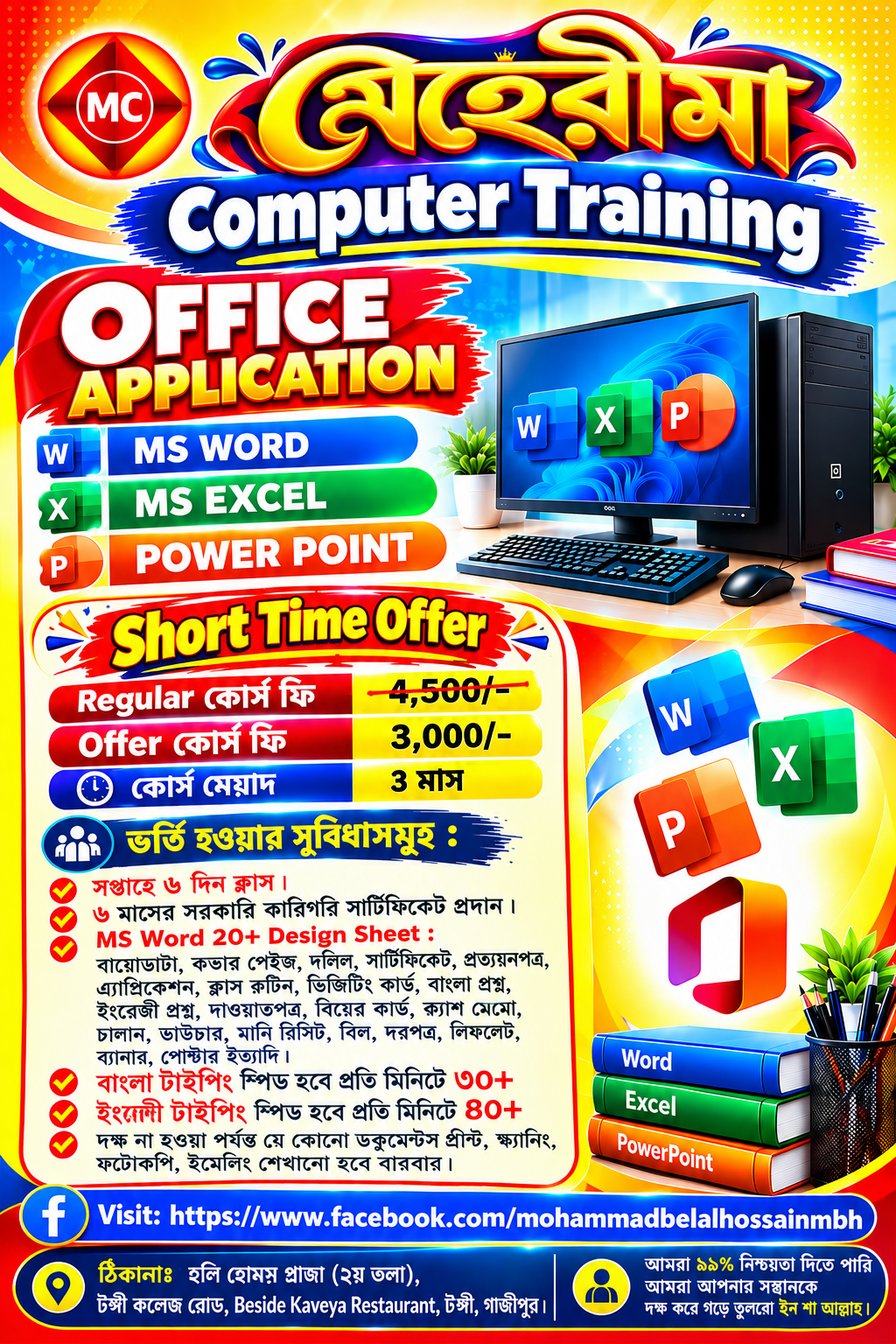
Learn Essential Computer Skills, Master Microsoft Word, Microsoft Excel & Microsoft PowerPoint & Develop Practical Office Management & Productivity Skills for Academic, Professional & Everyday use.
- Mastery of Microsoft Word (Formatting, Official Letters, Reports & Documentation)
- 10+ Practical Design Sheets Included Free
- Microsoft Excel (Spreadsheets, Formulas, Data Analysis & Automated Invoicing)
- Microsoft PowerPoint (Professional Pitch Decks & Animation Presentations)
- AI Prompting with ChatGPT & Gemini Included Free
- Windows OS Navigation, Typing Speed Mastery & Internet Safety Protocols
Practical Office Applications for Modern Careers
Whether you are preparing for government administrative jobs, corporate office roles, academic research, or freelancing, mastering essential computer tools is your first & most vital career step.
At Mehrima Institute, this program is strictly practical. You don’t just sit through theory lectures—you sit in front of dedicated workstations 6 days a week & build real-world office documents.
What You Will Master
1. 20+ Commercial Design Sheets in MS Word
Build ready-to-use professional assets from day one:
- Corporate Documents: Modern CVs / Biodata, official cover pages, & employment verification letters.
- Legal & Administrative: Land deeds (দলিল), affidavits, agreement contracts, & testimonials (প্রত্যয়নপত্র).
- Commercial & Financial: Cash memos, challans, vouchers, money receipts, bills, & tender proposals.
- Academic & Public: Bangla & English exam question papers, class routines, certificates, event leaflets, & banners.
2. Advanced Microsoft Excel & Business Calculations
- Automated employee salary sheets with overtime, tax, & medical allowances.
- Dynamic VLOOKUP & XLOOKUP models for inventory management & customer databases.
- Tabulated financial balance sheets, budgeting summaries, & interactive visual charts.
3. High-Impact Microsoft PowerPoint Decks
- Professional pitch decks with clean corporate layouts & custom transitions.
- Executive boardroom summaries & academic presentation workflows.
4. Hardware Independence & Typing Speed Mastery
- Guaranteed typing speed targets: Bangla 30+ WPM (Bijoy & Avro) & English 40+ WPM.
- Repeated hands-on drills with physical office equipment: multi-function laser printers, sheet scanners, photocopiers, & digital document archiving.
Level-by-Level Curriculum
Designed like an unlockable skill tree. Earn XP, finish concrete labs, & advance from novice to job-ready specialist.
Computer Fundamentals, Bangla & English Typing Speed
Build rapid touch-typing proficiency (Bijoy 52, Avro & English), Windows OS navigation, hardware connectivity, & essential digital literacy.
- Bangla Typing Speed (Target: 30+ WPM)
- English Typing Speed (Target: 40+ WPM)
- Windows OS Navigation & File Management
- Scanner, Printer & Hardware Operations
Microsoft Word & 20+ Real-World Commercial Design Sheets
Hands-on design of publication-ready corporate documents: modern CVs/biodatas, legal deeds (দলিল), certificates, question papers, cash memos, challans, & official letters.
- 20+ Commercial Office Design Sheets
- Bangla & English Typography & Formatting
- Tables, Headers, Footers & Watermarks
- Mail Merge & Automated Bulk Letters
Microsoft Excel: Automated Ledgers, Formulas & Analytics
Master financial calculation sheets, automated monthly payrolls, inventory logs, dynamic formulas (IF, VLOOKUP/XLOOKUP), & interactive Pivot Tables.
- Financial Formulas (IF, SUM, VLOOKUP, COUNTIF)
- Automated Payroll & Salary Sheets
- Pivot Tables, Slicers & Dynamic Charts
- Cash Memo & Billing System Automation
PowerPoint Presentations, Cloud Workspace & Office Hardware
Design persuasive pitch decks with clean layouts & master everyday office hardware: color printing, high-speed document scanning, photocopying, & formal emailing.
- Executive Slide Master & Animations
- Document Printing, Scanning & Photocopying
- Google Drive & Cloud Office Collaboration
- Professional Email Etiquette & Archiving
Final Capstone: Complete Commercial Office Management Suite
Assemble & print an end-to-end corporate office administrative package: legal agreement, automated Excel salary balance sheet, & a 10-slide executive pitch deck.
Frequently Asked Questions
Is this course suitable for complete beginners who never touched a computer?
Yes, absolutely! We start from fundamental mouse grip, keyboard ergonomics, & computer safety before transitioning to advanced office software.
Are government-recognized certificates provided upon completion?
Yes! Students who pass the final evaluation are eligible for the 6-Month Government Technical Board Certificate, valid for government (11th-20th grade & clerical positions) & corporate job applications.
How many days a week are classes held?
Classes are held 6 days a week with intensive hands-on computer lab access & continuous personal mentor supervision.
Can I practice printing, scanning, & photocopying in the lab?
Yes, our lab includes full commercial hardware. Students receive unlimited hands-on practice printing documents, scanning, photocopying, & laminating until complete self-sufficiency.